Firewall
System → Firewall (for an administrator) sets which ports of the server can be reached and from where. The panel manages nftables rules.
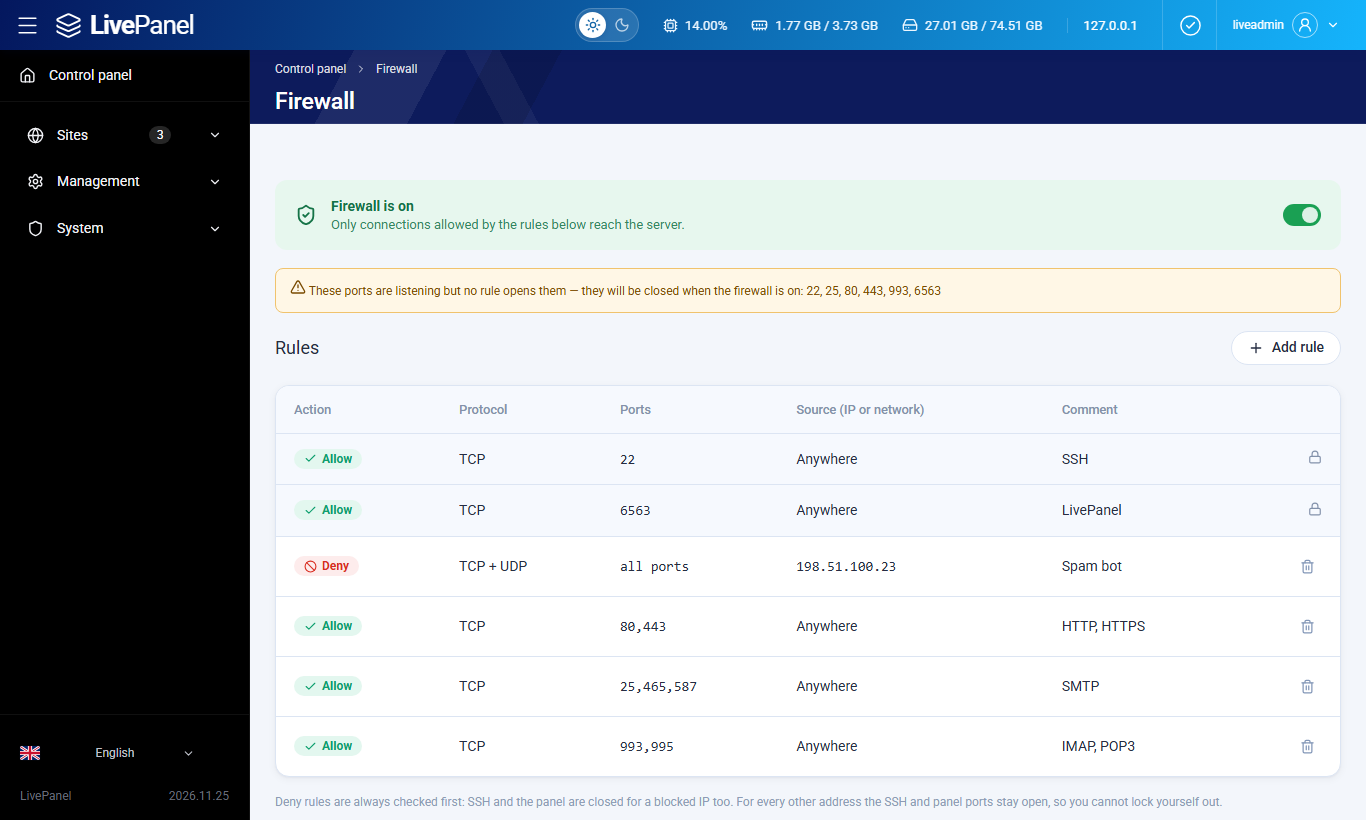
Turning it on
The firewall is off at first — the server is open on all ports. With the switch at the top on, only connections allowed by the rules reach the server.
The panel warns about:
- ports that are listening but no rule opens — they are closed when the firewall is on;
- ufw also being active on the server — both firewalls work together, and a connection gets through only if both allow it.
Rules
Each rule has:
| Field | Value |
|---|---|
| Action | Allow or Deny |
| Protocol | TCP, UDP or both |
| Ports | one (8080), a list (80,443) or a range (3000-3010); empty means all ports |
| Source | an IP or network (198.51.100.0/24); empty means anywhere |
| Comment | what the rule is for |
Default rules: HTTP/HTTPS (80, 443) and, when installed, FTP, SMTP, IMAP/POP3.
- Deny rules are always checked first. A deny rule needs a source; without ports the source is blocked completely.
- The rules for SSH and the panel port are system rules and cannot be removed, so you cannot lock yourself out of the server.
- When outside access to a database is on, a system rule for port 3306 and the listed addresses is added automatically — Databases.
Saving and safety
Save and apply applies the rules immediately. If after applying the panel cannot confirm the connection with your browser within a minute (for example, you blocked yourself), the previous rules are restored automatically.
The rules survive a server reboot.
Your provider may also have an external firewall (in its cloud panel) — the panel’s rules work behind it.