Installing CMS and frameworks
The panel installs popular CMS and frameworks in one click: it downloads them, creates a database when needed, configures and starts them. You can install an application in two places:
- Site creation wizard → CMS / Framework — the site and the application are created together (Creating a site);
- the Application installer tile of an existing empty site.
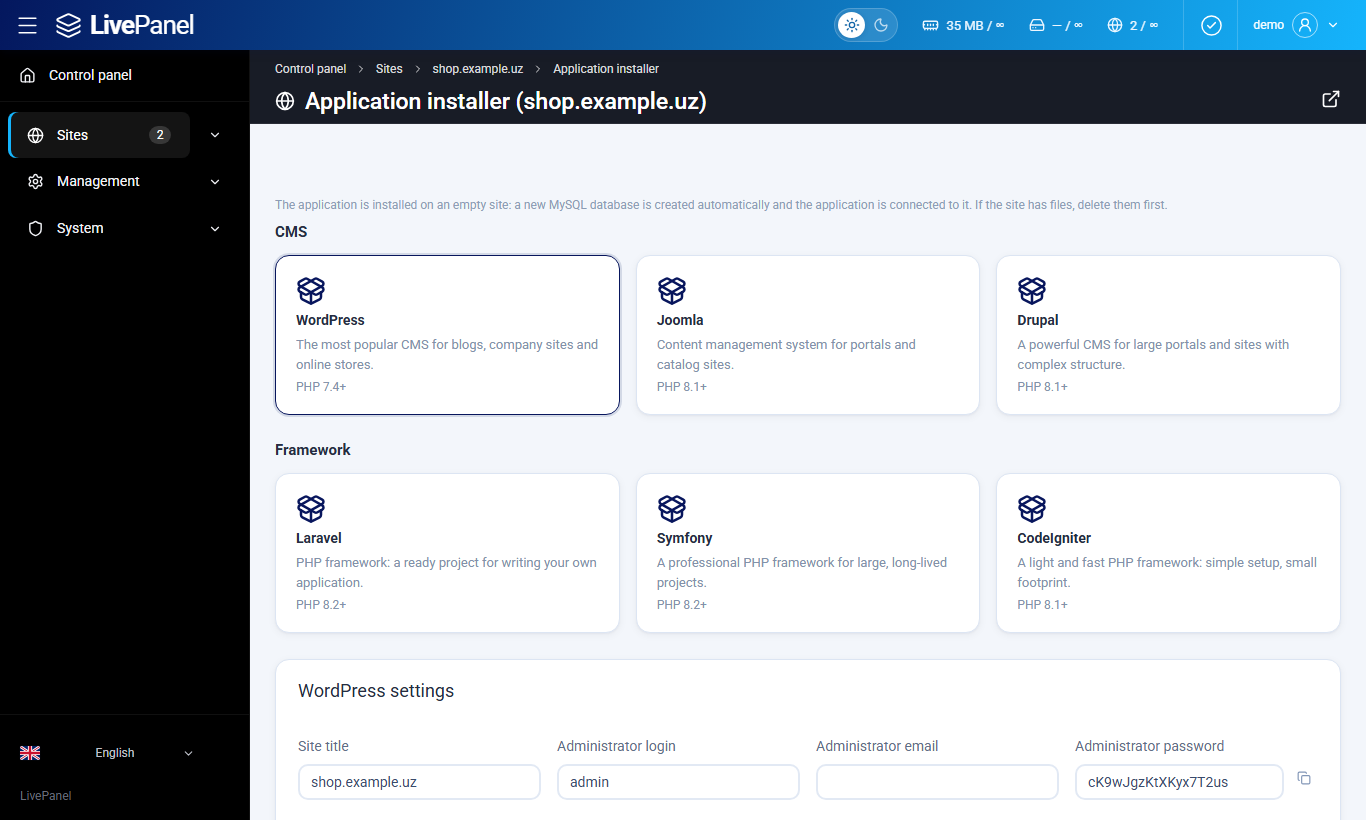
Applications
| Platform | CMS | Frameworks |
|---|---|---|
| PHP | WordPress (PHP 7.4+), Joomla (8.1+), Drupal (8.1+) | Laravel (8.2+), Symfony (8.2+), CodeIgniter (8.1+) |
| Node.js | Strapi (Node.js 20+), Ghost (22+) | Express (18+), Next.js (20+), NestJS (20+) |
| Python | Wagtail (Python 3.11+) | Django, Flask, FastAPI (3.11+) |
The application must match the site type: a PHP application on a PHP site, a Node.js application on a Node.js site, and so on. If the site’s PHP/Node.js/Python version is too old, the panel warns you — raise the version in the site settings.
Installing
- The site must be empty (only the panel’s starter page). If it has files, delete them first or create a new site.
- Open the Application installer tile and choose the application.
- For applications with an administrator (WordPress, Joomla, Drupal, Wagtail, Django) fill in:
- the Site name;
- the Administrator login, email and password (at least 12 characters; the panel suggests one).
- Click Install ….
The progress is shown step by step (database, download, configuration, installation, start). It can take a few minutes; the installation continues even if you close the page.
The result
When the installation finishes you get:
- the site address and a link to the admin panel (e.g.
/wp-admin/for WordPress,/admin/for Django and Wagtail,/docsfor FastAPI); - the created database name, user and password — save them.
On an error the reason and the process log are shown; the site is returned to its starting state and you can try again with New installation.
By platform
- PHP CMS — the files go into the site folder and are connected to a new MySQL database. WordPress is installed with WP-CLI.
- PHP frameworks — the project is created with Composer; the site’s web root becomes the project’s
public/folder. - Node.js — the project is created in the site folder, built when needed (
npm run build) and started by the site service. Strapi and Ghost get a MySQL database. - Python — the project is created in the site folder, packages go into the site’s
.venvand Gunicorn runs it. Django and Wagtail keep their data in an SQLite file; static files are served by WhiteNoise.
How to manage Python and Node.js projects afterwards — Python and Node.js sites.